
Ask about any loan. Get the page behind the answer.
Cali is the AI assistant built into FloodCaliber™, which runs inside your environment. It explains each number in plain words and points to the page it came from.
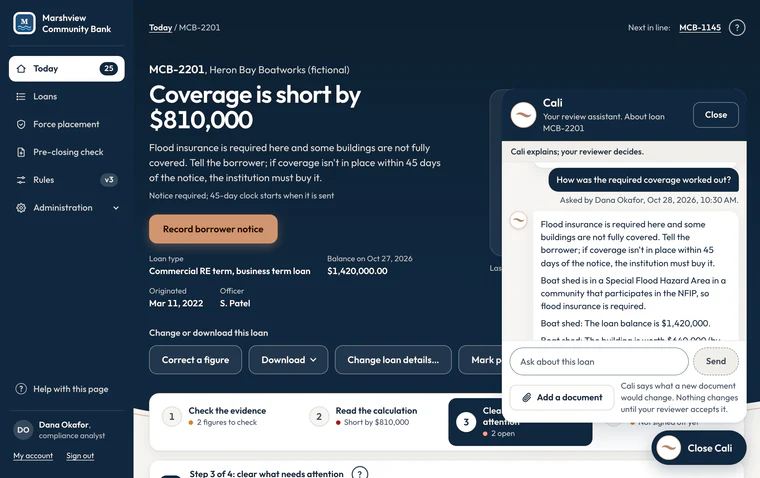
 CaliAbout loan MCB-2201
How was the required coverage worked out?
The boat shed is in a Special Flood Hazard Area, in a community that takes part in the NFIP, so flood insurance is required.
Cali explains; your reviewer decides.
In short: Cali, said like the start of “California”, is the AI assistant inside every FloodCaliber™ review. It answers in plain words and shows the page behind each answer; a person at your bank decides.
What can Cali do, and what can’t it?
Cali explains. Your reviewer decides.
Cali can
- Answer your questions. Where to start, why a finding is open, where a number came from.
- Read the documents you hand it. A packet, a renewal or an addendum: sorted, read and linked to its page.
- Make the edit you confirm. You see before and after first. Confirming saves a new version.
Cali can’t
- Approve a review. A second reviewer does, and nobody approves their own.
- Work out the required coverage. Versioned calculation rules do the math, not the AI.
- Change a case on its own. Every suggested edit shows its evidence and waits for you.
How is Cali kept safe inside your bank?
Cali works inside FloodCaliber™, which runs inside your environment, under the controls your security team approves.
Your loan files stay put
Your loan files stay in your environment. Cali reads them there.
Only approved connections
FloodCaliber™ reaches government data sources and document AI services only through the connections your security team approves.
Every edit is checked and kept
A suggested edit passes a permission check, and a confirmed edit is saved as a new version in the review’s history.
Your playbook, approved first
Show Cali your workflow, evidence and wording. Each example waits for a policy owner’s approval and never changes the calculation.
What does Cali cost?
Cali works inside every Command Center review. Cali conversation subscriptions are optional and priced separately; your proposal sets out the usage and billing before activation.
Try it yourself: ask Cali about a sample loan
A plain answer, and the page it came from. Pick a question about the fictional sample loan.

CaliSample loan · Bayview Commerce Park
Fictional dataWhy is there a gap on B-01?
The policy covers the building, but contents weren’t elected. B-01 needs $120,000 of contents coverage.
- Building coverage$500,000
- Contents coverageNot elected
- Deductible$2,000
Why is the house left out?
B-03, the caretaker’s house, is in Zone X, outside the flood zone, so it is excluded. The office and the warehouse are in Zone AE.
- B-01 OfficeZone AE
- B-02 WarehouseZone AE
- B-03 Caretaker’s houseZone X · excluded
Here’s the renewed flood policy.flood-policy-renewal.pdf · 6 pages
It’s an NFIP flood policy. Contents coverage for B-01 is $120,000 on page 2, effective 2027-03-01. Here’s the change I’d make:
| Value | Before | After |
|---|---|---|
| B-01 contents coverage | $120,000 | |
| Gap | $0 |
Confirm editCancel
Confirm.
Done. The edit is saved as a new version with the policy attached, and the case goes back to your second reviewer.
Each answer shows the page it came from. A person at your bank decides.